
The hardest question in an SAP migration isn't how to move an interface. It's whether to move it at all, and what it should become if it does.
Two customer migrations show why. A global manufacturer moved 160+ BizTalk interfaces to SAP Integration Suite in six months. A second customer left Boomi against a licence expiry date. The source platforms and the pressures were different, and both went live without major business disruption. Both were automation-led, and both show where the real work in a migration to SAP Integration Suite sits.
How to decide what moves, what changes and what goes
The decision comes before any tooling. Every interface on the old platform has a history. Some still do exactly what the business needs. Some were built around the limits of the old platform. Some no longer earn their place. A one-to-one move treats them all the same and carries the old design onto the new platform.
That's why each interface gets one of five outcomes before anything moves: migrate as is, modernise, redesign, replace or retire. Retiring is the cheapest, because an interface you retire is one you never migrate, test or run. Replacing swaps a custom interface for maintained standard integration content, where it now exists.
Migration is mostly a technical exercise. Classification is a business and architecture decision. Tooling can point the way, based on complexity and real usage, but the final call stays with your architects and the business. Two questions help with every interface. Does it reflect how your business works today, or how it worked when it was built? And if you built it today, would you design it the same way?
On SAP PI/PO landscapes, the detailed assessment builds on SAP's own Migration Assessment and checks decommission candidates against real traffic, so retire decisions rest on usage rather than on memory. The SAP PO to CI migration page covers that route, and the SAP PO migration timeline calculator gives an indicative duration for your landscape.
BizTalk to SAP Integration Suite: 160+ interfaces in six months
The global manufacturer wanted to leave BizTalk without affecting business operations, and to land on its own decoupled integration framework rather than a copy of the old setup. The 160+ interfaces included highly complex and customised ones. None was lifted and shifted.
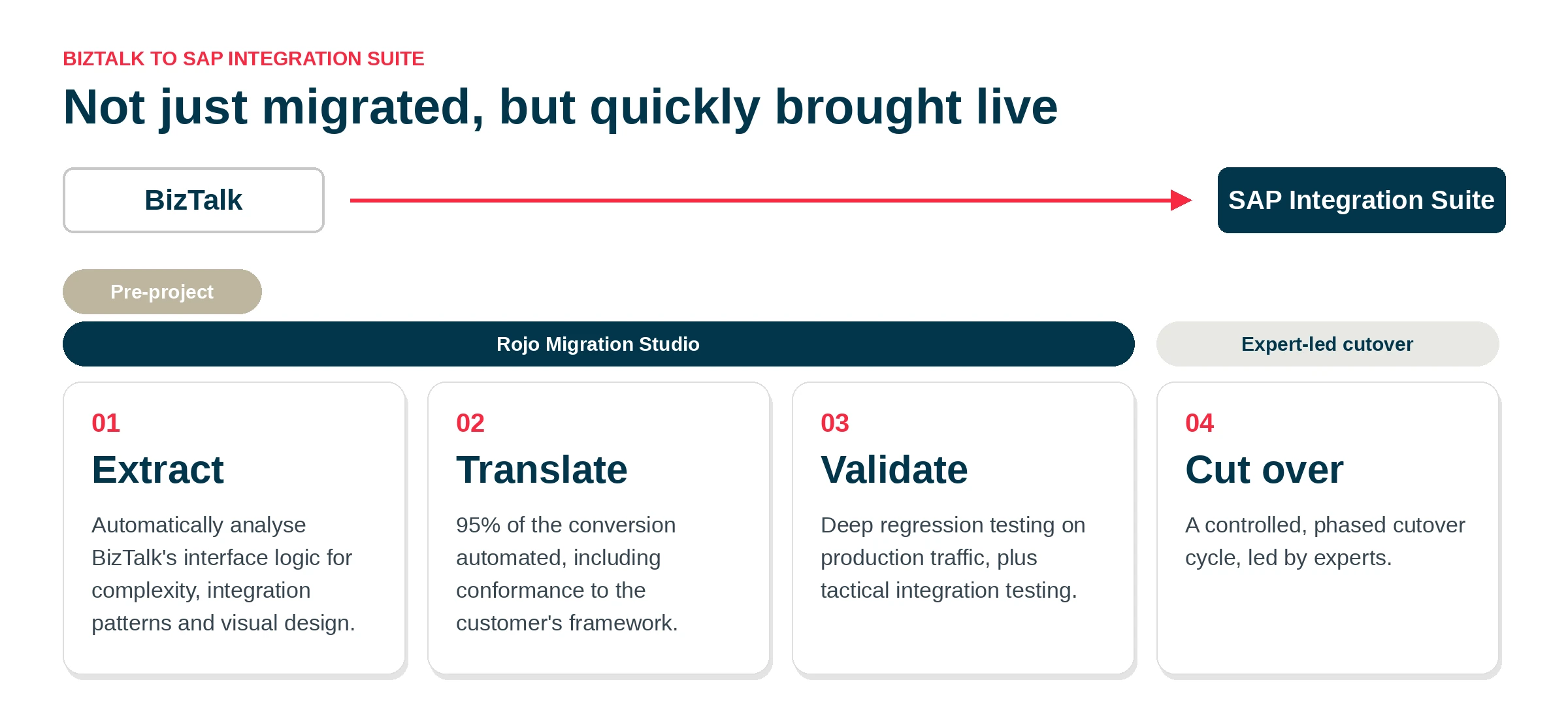
Rojo Migration Studio first analysed the BizTalk interface logic automatically, for complexity, integration patterns and visual design. 95% of the conversion onto the customer's framework was then automated. Deep regression testing, tactical integration testing and a controlled, phased cutover led by experts did the rest. The customer went live on the committed timeline and within budget, 80% of the full extract-to-live transition was automated, and BizTalk has been decommissioned.
How a migration proves nothing broke
At cutover, the only question the business cares about is whether the new interfaces behave exactly like the old ones. For this customer, 10,000+ regression cases ran before cutover.
The method is simple to describe. Migration Studio captures production request and response payloads, builds unique test cases from them and replays them in SAP Cloud Integration. The output is compared field by field in JSON or XML, with allowed deviations ignored. Your production traffic, replayed and compared field by field.
It was business as usual from day one: fewer than five production incidents during or after go-live, and zero priority incidents. Planning the same route? See the BizTalk to SAP Integration Suite migration page.
Boomi to SAP Integration Suite: a licence with an expiry date
The second customer's pressure was different. The Boomi licence had a fixed end date, and the reasons behind many historical design decisions were no longer clear. Using automation and reusable patterns, the full platform transition took five months or more. The customer went live ahead of time and within budget, with 100% stakeholder sign-off and no P1, P2 or P3 incidents. Boomi has been decommissioned.
That's what production-ready interfaces mean. Going live without business disruption is what counts, because nobody decommissions the previous platform on interfaces that only run in a test environment of the new one. Moving from Boomi? See how mappings are converted and tested rather than rebuilt by hand on the Boomi to SAP Integration Suite migration page.
What automation does in a migration to SAP Integration Suite
Extraction, conversion and regression testing repeat for every interface, so that's where automation pays off. Rojo Migration Studio automates 80% of the migration work, from extraction to go-live. Naming conventions, exception handling and monitoring are applied during conversion, so interfaces arrive already built to your standards rather than merely working as before.
You migrate in months rather than years, with a track record of 100 interfaces a month from extraction to go-live. What stays human is the final call on what each interface should become, and running the cutover.
The lowest-risk way to see that split on your own landscape is a pre-project: a small subset of your interfaces taken through the full cycle, regression validated, to production-ready. The process is the same whichever platform you start from, and Rojo supports teams that need to migrate to SAP Integration Suite from any platform: assess, extract, translate, validate, cut over.
Don't move the past, design the future.
Where to start
Not sure where your landscape sits? Answer eight questions and get a recommended approach, an indicative timeline and the automation gains of Migration Studio: Take the Migration Assessment. More calculators and assessments are listed under SAP migration assessment tools.